1
Upload Photo & Dimensions
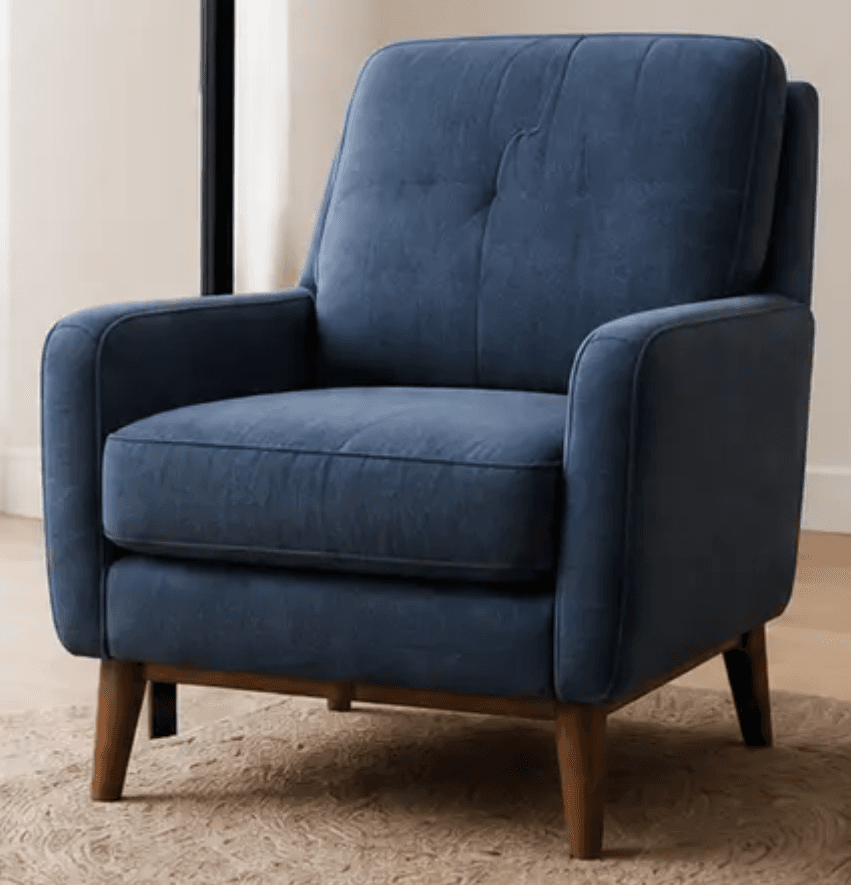
Add one clear product photo and real Length × Height × Depth.
L 75 cmH 85 cmD 80 cm
Loading the interactive 3D model.
Upload one photo and real dimensions. Our AI creates a realistic 3D model customers can place in their room at its actual size.
Generate your first AR-ready model free. Pay only to download & share. No credit card required.
 Dostępne w Shopify App Store
A faster path to AR
A simple workflow from real-world product details to a customer-ready AR experience.
Add one clear product photo and real Length × Height × Depth.
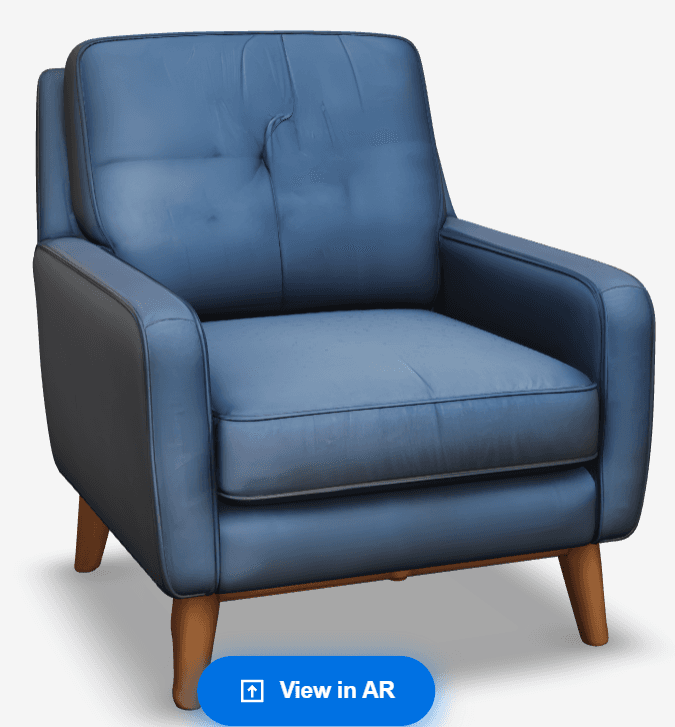
SpaceCheck creates a realistic 3D preview, including estimated hidden surfaces.
 AI 3D
AI 3DRotate and inspect the model from every angle before publishing.
Use Shopify, a QR code, a share link, or downloadable model files.
Why SpaceCheck
A clearer path from product photography to customer confidence.
Try the live handoff
View the Krzesło in your room directly from this phone.
Open the AR experience directly on this device.
Your phone may ask for permission to use the camera.
Move your phone slowly to detect the floor, then tap to place the furniture.
Comparison: SpaceCheck.app vs Traditional 3D Studio
SpaceCheck is designed for retailers who need usable 3D and AR assets without commissioning every model from scratch.
SpaceCheck.app
From $4.95 per model
Traditional 3D Studio
Project-based pricing
SpaceCheck.app
AI-assisted output in minutes
Traditional 3D Studio
Often days or weeks
SpaceCheck.app
One dashboard flow
Traditional 3D Studio
Manual production workflow
SpaceCheck.app
No 3D designer needed
Traditional 3D Studio
3D specialist required
Simple economics
Twórz modele 3D za darmo. Płać tylko, gdy chcesz pobrać, udostępnić lub uzyskać kody QR.
Każdy kredyt odblokowuje jeden model do pobrania, udostępniania i kodów QR.
Credits are separate from Shopify monthly generations. Each credit unlocks one generated model for sharing and download.
Ceny w USD. Twój bank automatycznie przelicza na PLN przy płatności.
Details
Wszystko, co musisz wiedzieć o korzystaniu ze SpaceCheck.
Follow these tips to help generate a more accurate 3D model from a single product image.
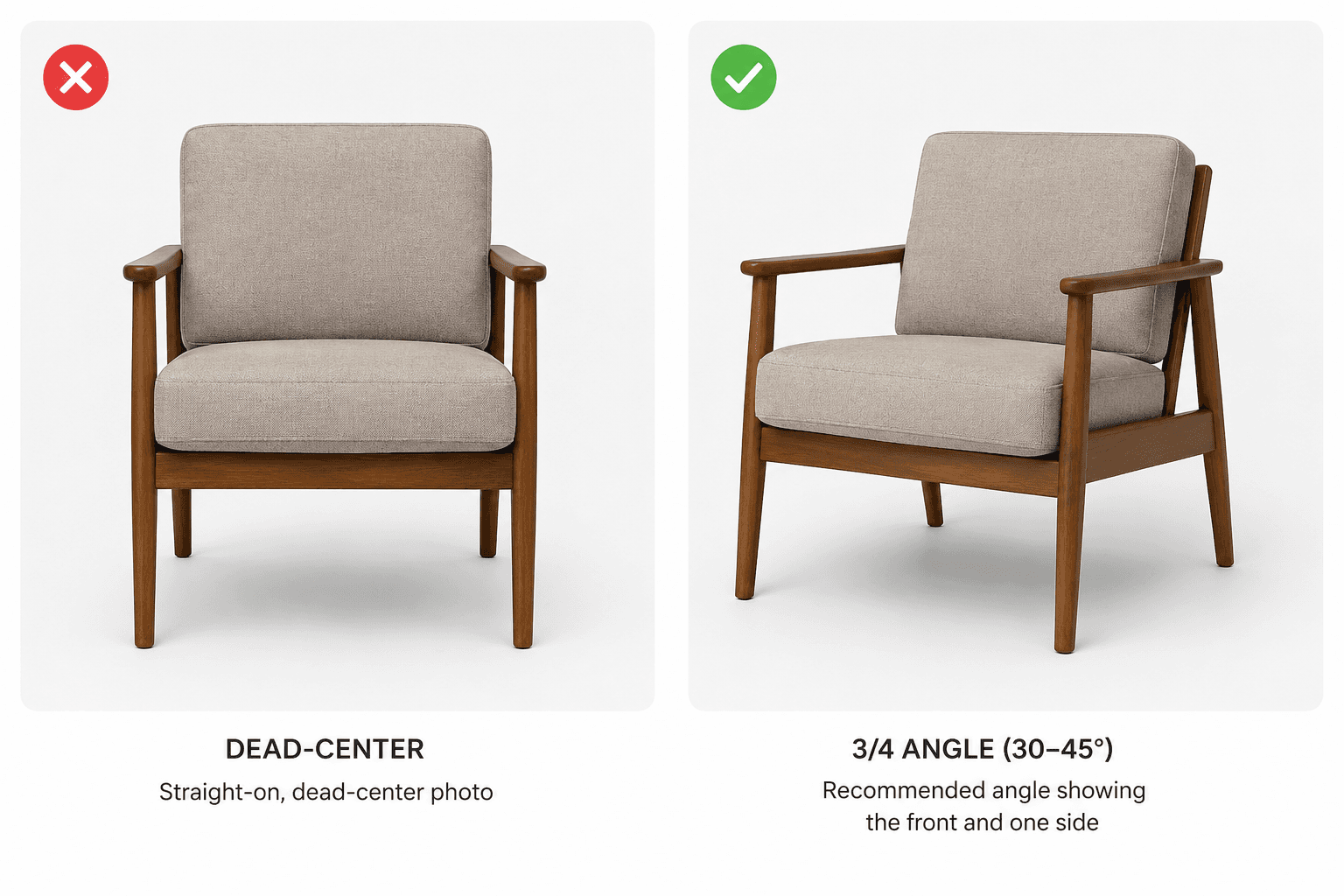
Use a 3/4 angle (30–45°).
Photograph the furniture so the front and one side are both clearly visible. This gives the AI more depth information than a straight-on image.
SpaceCheck creates a complete 3D model from one product image. Surfaces that are not visible in the photo, such as the back, underside, or hidden side, are estimated by AI and may not exactly match the physical product.
Swipe to view all 5 steps
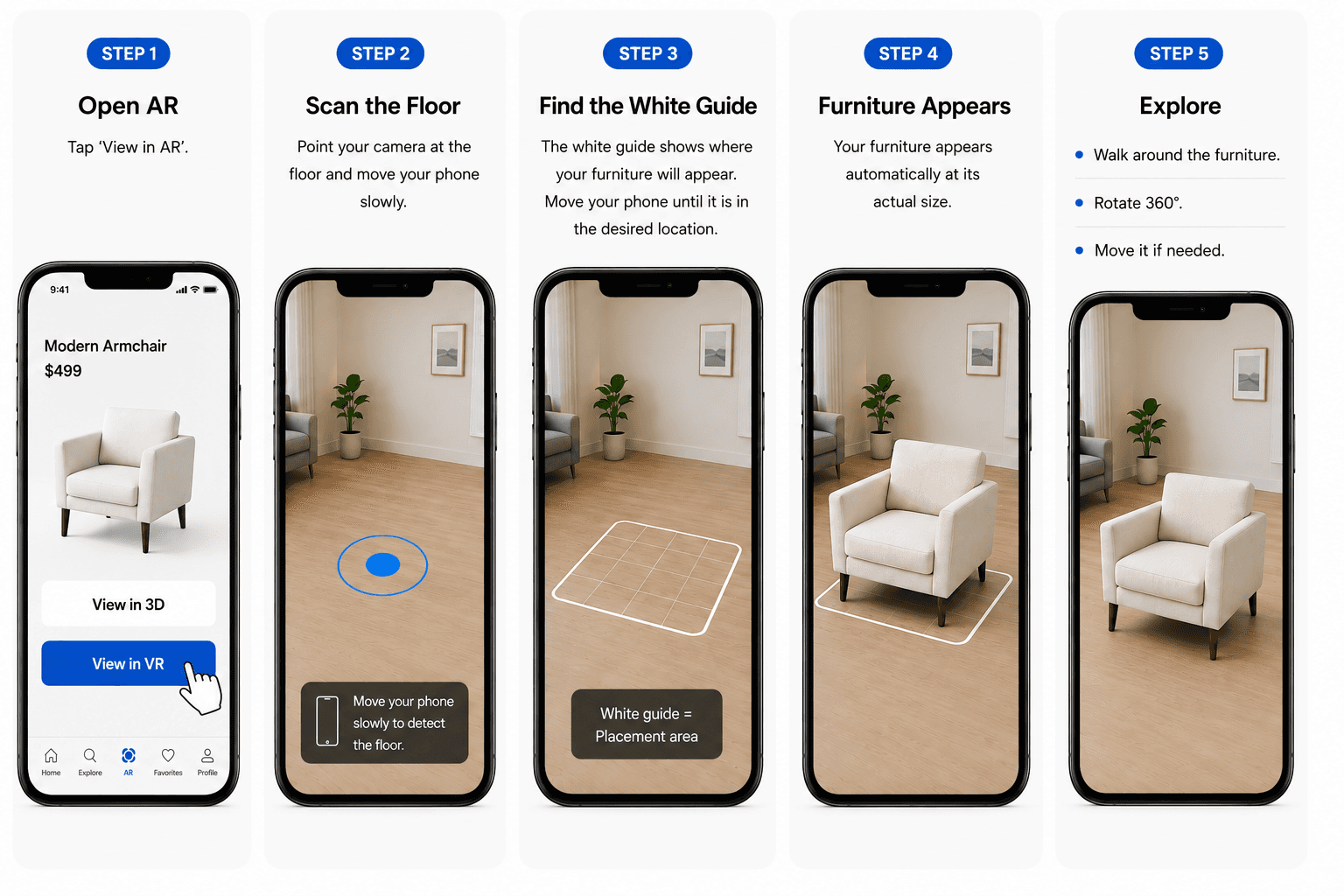
Tap "View in My Room".
Point your camera at the floor and move your phone slowly.
The white guide shows where your furniture will appear. Move your phone until it is in the desired location.
Your furniture appears automatically at its actual size.
Walk around the furniture. Rotate it 360 degrees. Move it if needed.
Furniture is shown at its real dimensions and cannot be resized.
Back to Experience it yourselfSpaceCheck uses one supplied product image to create an AI-generated 3D model. The visible shape, colour and product features in the photo guide the result.
AR scale is based on the Length × Height × Depth entered by the merchant. SpaceCheck does not estimate the product dimensions from the photo.
SpaceCheck turns furniture product photos into AI-generated 3D models that customers can view interactively and place in their space using AR. It is designed for furniture retailers and ecommerce sellers.
Upload a clear product photo, enter the product details and dimensions, then start generation. Once the model is ready, you can preview it before deciding whether to unlock it.
A clear single product photo can be used. A 3/4 view showing the front and one side usually gives the AI more useful visual information.
Use a clear, well-lit product photo with the furniture unobstructed and easy to distinguish from the background. A 3/4 angle showing the front and one side usually works best.
Yes. A phone photo can work well as long as the image is clear, well lit and shows the product properly. Professional studio photography is not required.
AI generation normally completes in minutes, but processing time can vary depending on the model and current service load. You can return to the dashboard to check the result.
If a generation fails, delete the failed model and try generating it again. If it continues to fail, sign out of SpaceCheck, sign back in and retry. If the problem persists, contact SpaceCheck Support.
Give the generation some additional time and refresh the dashboard. If it eventually shows Failed, retry the generation. If it repeatedly remains stuck or fails, contact Support.
Yes. Generated models can remain private in your dashboard so you can inspect the 3D result before spending an unlock credit.
Yes. If you are not happy with a generated result, you can remove the failed or unwanted model and generate another one.
The 3D appearance is AI-generated from your supplied photo. Visible shapes, colours and features provide the strongest reference. Areas the image does not show are estimated by AI, so always review the model before publishing.
No. SpaceCheck creates a realistic AI-generated representation, not a CAD reconstruction or physical 3D scan. Hidden geometry and fine surface details may differ from the real product.
Fine material details such as fabric weave, stitching, grain or subtle surface texture can be simplified during AI generation. Always preview the generated model before publishing.
The uploaded image guides the visible colours and appearance, but lighting, image quality and AI generation can cause some variation. Preview the final model before sharing it with customers.
SpaceCheck is designed primarily for automated generation, preview, unlocking and publishing rather than detailed manual 3D modelling. If a result is unsuitable, try generating another model from a better source image.
No. SpaceCheck is a product-visualisation and AR tool. It should not be used as a CAD model, manufacturing model, technical drawing or physical scan.
You provide the product's real Length × Height × Depth. SpaceCheck uses those dimensions to prepare the model for AR placement at its intended physical size.
No. AR scale is based on the product dimensions you provide rather than estimating physical size from the photograph.
The intended experience is to show the product at the dimensions you provide rather than allowing customers to arbitrarily resize it.
Enter the real-world Length × Height × Depth of the product using the unit shown in the dashboard. Use the retailer or manufacturer's actual product specifications.
Incorrect dimensions will affect the scale shown in AR. Check the manufacturer's product measurements before publishing the model.
SpaceCheck uses your supplied dimensions for model scale, but AR placement also depends on the phone, camera tracking, floor detection and environment. It is a visualisation tool rather than a measuring instrument.
No. SpaceCheck is designed to launch AR through supported mobile browsers and native AR viewers without requiring customers to install a SpaceCheck app.
Customers open the AR link or scan the QR code, scan the floor with their phone, and place the furniture into their space using a supported device.
SpaceCheck supports compatible iPhone and Android AR workflows using supported mobile browsers and native AR viewers.
Point the camera toward a well-lit, textured floor and move the phone slowly so the device can understand the surface. Avoid very dark, reflective or featureless areas where possible.
The white placement guide indicates where the furniture can appear. Move your phone until the guide is positioned where you want the furniture.
Yes. Once placed, customers can move around the AR object and view it from different directions using a supported device.
One unlock credit makes one generated model available for customer-facing use such as sharing, QR codes and supported file downloads.
No. Generation and private preview are separate from unlocking. The unlock allowance is used when you choose to make a model available for sharing, AR links, QR codes or supported downloads.
The current one-time credit packs are A$7 for 1 credit, A$29 for 5 credits and A$99 for 20 credits.
Purchased one-time credits remain available until you use them.
If purchased one-time credits are available, SpaceCheck uses those first. Your Shopify allowance should remain unchanged for that unlock.
The model remains private in your dashboard and can still be previewed. Unlocking is required for public sharing, QR codes and supported downloads.
Try the payment again and confirm your payment details are correct. If multiple payment methods fail or the issue continues, contact SpaceCheck Support rather than repeatedly attempting the same transaction.
Yes. SpaceCheck can connect to a Shopify store and support product 3D and AR workflows through the existing Shopify integration.
The Shopify plan provides a monthly model-unlock allowance managed through Shopify billing. Your dashboard shows the current plan and remaining Shopify allowance.
Yes. Shopify subscribers can purchase additional one-time credit packs separately. These remain available until used and are separate from the monthly Shopify allowance.
A Shopify store should stay associated with its intended SpaceCheck owner account. If the store appears connected to the wrong account, do not start another subscription. Contact Support.
Reinstalling should reconnect the existing store relationship rather than repeatedly granting a new free trial. If billing or ownership looks incorrect after reinstalling, contact Support.
Shopify-managed subscription billing, plan details and cancellation are handled through Shopify Admin. SpaceCheck reflects the verified Shopify subscription status in your dashboard.
Unlocked models can provide supported 3D formats such as GLB for web and Android workflows and USDZ where supported for iPhone AR.
Yes. Unlocked models can be used with QR codes for printed displays so customers can scan the product in-store and continue the AR experience on their phone.
SpaceCheck supports web sharing and embed workflows for unlocked models. Use the publishing options available for the model you want to share.
Yes. Private preview lets you inspect the generated result before you unlock or share it publicly.
Use the SpaceCheck login page and your available sign-in method. If you originally registered through a connected login provider, use the same method when possible.
First confirm you signed into the same SpaceCheck account used to create the models. If the dashboard is still empty, sign out and sign back in. Contact Support if the models remain missing.
Use the existing SpaceCheck Support or Contact option. Include your account email, model name and a short description of the problem so the issue can be investigated faster.
Start with one product photo, add real dimensions, and preview the result before you publish.